Final Notes
Debugging
The Easy Trace-Trail System provides powerful visual debugging tools to help you tune and troubleshoot your trace configurations.
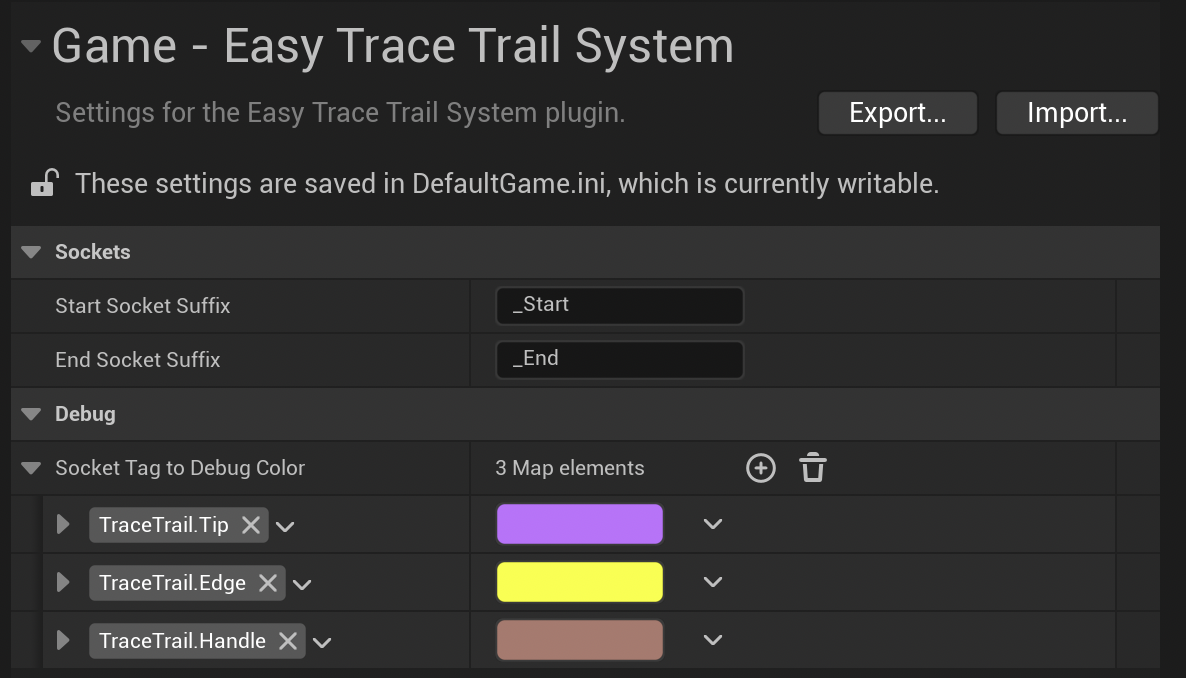
Visual Trace Debugging
Location: Project Settings → Plugins → Easy Trace-Trail System → Debug Settings
Color-Coded Traces:
Map each socket tag to a unique color for easy identification during runtime. This allows you to:
- Distinguish between different socket sections (tip vs edge vs handle)
- Identify which part of your socket is actually making contact
- Verify that your socket sections are positioned correctly
By assigning them to Gameplay Tags, you can see the intended use of those sections. So like in the previous example, you can see the color change of the sections based on the Attack Motion.
Activation:
Set your Debug Draw Trace in Task Settings to:
- For Duration - Traces remain visible for the specified Debug Draw Time
- For One Frame - Traces appear briefly (for the Trace's Fps Time)
Conclusion
The Easy Trace-Trail System is designed to give you precise, performance-optimized hit detection for any weapon-based combat system. Whether you're creating a medieval sword fighter, a futuristic lightsaber duel, or a magical staff combat system, this plugin provides the flexibility and control you need.
Key Advantages:
- Modular Design - Configure different sections of your weapons independently
- Performance Optimized - Intelligent trace distribution with no gaps or overflow
- Developer Friendly - Comprehensive debugging tools and clear visual feedback
- Production Ready - Battle-tested subsystem architecture with proper cleanup
Getting the Most Out of the Plugin:
- Start with simple configurations and gradually add complexity
- Use debug visualization during development to validate your setup
- Experiment with different trace shapes for different weapon types
- Leverage the priority system for complex multi-section weapons
We hope this plugin enhances your game development workflow and helps you create engaging gameplay experiences. If you have questions, suggestions, or need support, please don't hesitate to reach out to us through our support channels.
Happy developing! 🗡️