Use Case Example
This page shows one practical way I integrated the plugin into my project so you can see the typical workflow. This is only an example — adapt it to your needs.
Melee Attack Gameplay Ability
I use a custom Gameplay Ability class for melee attacks. The class is mostly a standard Gameplay Ability but I set the Instancing Policy to Instanced Per Execution so each activation creates a separate instance. You can use different instancing if your project requires it.
Adding Ability To The Queue
My input → queue flow is:
- Player presses an ability input → call
Press Input IDon the Ability System Component. - When the ability's
Event Activate Abilityruns, create/start theAdd Ability To Queuetask.
This lets input presses request activation even if the ability is already active.
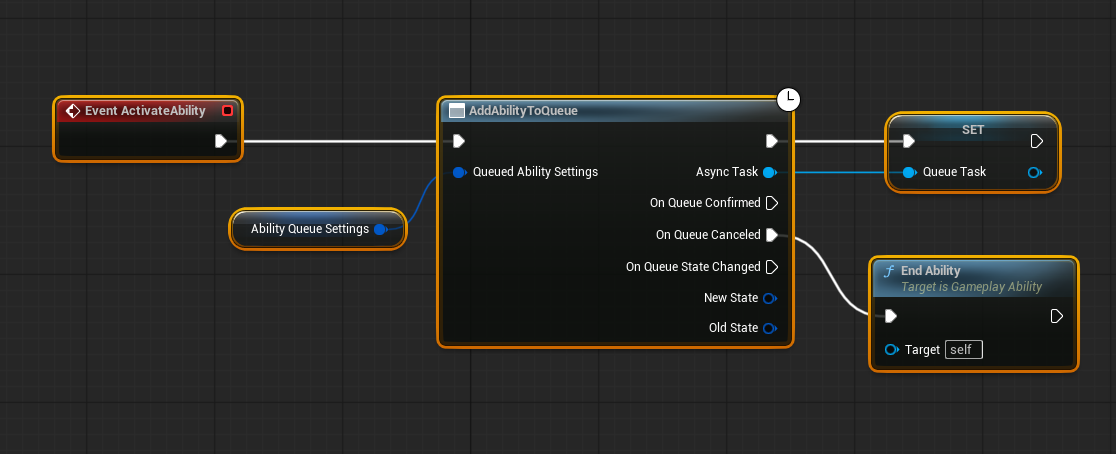
- Add a boolean (e.g.
Activate on Every Input Press) to abilities that should spawn a new instance per press. - Override
AbilityLocalInputPressed(int32 InputID)in yourAbility System Componentto check the flag and callTryActivateAbility(Spec.Handle)when the flag is true.
The code you provided performs exactly this: it checks your custom ability's boolean and either forces a new instance or forwards the input to the active instance.
Because a new ability instance (and therefore new task) can be created on every press, creating the Add Ability To Queue task in Event Activate Ability works naturally with repeated inputs.
Important: clean up queued tasks when they are cancelled (handle On Queue Canceled) so requests do not linger.
void UThrallGuardAbilitySystem::AbilityLocalInputPressed(int32 InputID)
{
	// Consume the input if this InputID is overloaded with GenericConfirm/Cancel and the GenericConfim/Cancel callback is bound
	if (IsGenericConfirmInputBound(InputID))
	{
		LocalInputConfirm();
		return;
	}

	if (IsGenericCancelInputBound(InputID))
	{
		LocalInputCancel();
		return;
	}

	// ---------------------------------------------------------

	ABILITYLIST_SCOPE_LOCK();
	for (FGameplayAbilitySpec& Spec : ActivatableAbilities.Items)
	{
		if (Spec.InputID == InputID)
		{
			if (Spec.Ability)
			{
				bool bShouldForceActivate = false;
				if (UThrallGuardGameplayAbilityBase* ThrallGuardAbility = Cast<UThrallGuardGameplayAbilityBase>(Spec.Ability))
				{
					bShouldForceActivate = ThrallGuardAbility->bActivateOnEveryInputPress;
				}

				Spec.InputPressed = true;

				if (bShouldForceActivate)
				{
					// Force activate a new instance regardless of current state
					TryActivateAbility(Spec.Handle);
				}
				else if (Spec.IsActive())
				{
					// Default behavior: send input pressed to active ability
					if (Spec.Ability->bReplicateInputDirectly && IsOwnerActorAuthoritative() == false)
					{
						ServerSetInputPressed(Spec.Handle);
					}

					AbilitySpecInputPressed(Spec);

					PRAGMA_DISABLE_DEPRECATION_WARNINGS
					// Fixing this up to use the instance activation, but this function should be deprecated as it cannot work with InstancedPerExecution
					UE_CLOG(Spec.Ability->GetInstancingPolicy() == EGameplayAbilityInstancingPolicy::InstancedPerExecution, LogTemp, Warning, TEXT("%hs: %s is InstancedPerExecution. This is unreliable for Input as you may only interact with the latest spawned Instance"), __func__, *GetNameSafe(Spec.Ability));
					TArray<UGameplayAbility*> Instances = Spec.GetAbilityInstances();
					const FGameplayAbilityActivationInfo& ActivationInfo = Instances.IsEmpty() ? Spec.ActivationInfo : Instances.Last()->GetCurrentActivationInfoRef();
					PRAGMA_ENABLE_DEPRECATION_WARNINGS
					// Invoke the InputPressed event. This is not replicated here. If someone is listening, they may replicate the InputPressed event to the server.
					InvokeReplicatedEvent(EAbilityGenericReplicatedEvent::InputPressed, Spec.Handle, ActivationInfo.GetActivationPredictionKey());
				}
				else
				{
					// Ability is not active, so try to activate it
					TryActivateAbility(Spec.Handle);
				}
			}
		}
	}
}
This is the same logic as the parent implementation with the added bShouldForceActivate check. So your ability system component will work as expected. If that flag is true, the code forces activation of a new ability instance on each input press.
After enabling this behavior, pressing an ability input creates a new ability instance (if the flag is set), so Add Ability To Queue can be called in Event Activate Ability safely. Remember to finish or cancel queued tasks/abilities via your On Queue Canceled handling by using End Ability.
Changing Queue States
I use the bAutoCommitAbility on the Ability Queue Settings. So whenever the queue gets confirmed, Event Commit Execute will fire too.
In Event Commit Execute I wait for gameplay events using Wait Gameplay Event ability task. Such as GameplayEventTagsCategory.AnimNotify.Queue.Main. This tells us our montage has entered a prior state that is no longer cancelleable by lower priority abilities such as dodge. So I call the Start Ability Queue State from my Queue Task and set the new state as main thus updating the priority of the playing ability.
I use Anim Notifies to send gameplay events to my pawn in my animation montages. This way I can precisely set the state changing points.
In network environments you should change your states at the same time as the server on clients. Animation Notifies work, because the montage is being played plays both on the server and the client.
So in order to not cause desync choose events that both fires on the server and the client or use replication.
That is it! After that this is just a regular gameplay ability.